
Navigating the Best Route for Providing Assistive Devices
Navigating the Best Route for Providing Assistive Devices
Description
How do you provide assistive devices to clients when there are limited funds? Maybe you hesitate to provide information on devices you feel cannot be purchase, or get bogged down by requests to change batteries? Join OIB-TAC’s Jennifer Ottowitz as we explore best practices for managing assistive devices along with creative solutions.
Video
Transcript
Welcome to OIB-TAC’s monthly webinars, where our presenters share valuable information and helpful resources to support professionals working with older adults who are blind or vision impaired. Let's check out this month's webinar.
Today's presentation, Navigating the Best Route for Providing Assistive Devices, with Jennifer Ottowitz. Jennifer, familiar face, has been helping adults who are blind or have low vision, more, live more independently and confidently for over 30 years. With a master's degree in special education for the visually impaired from Northern Illinois University and a certification in vision rehabilitation therapy, she worked in center-based programs in Illinois and Wisconsin before providing distance education as a learning expert with Hadley.
Jennifer currently works here with us as an older blind specialist with the Older Individuals Who Are Blind Technical Assistance Center, part of the National Research and Training Center on Blindness and Low Vision. Hi, Jennifer.
Hi, TJ. Thank you so much for that, that great introduction and getting us off to a great start.
So TJ's gonna be running slides, for me today as well, but thank you all, and welcome to Navigating the Best Route for Providing Assistive Devices. TJ, if we can go to the slide with the objectives. All right. So today you're gonna be able to explain the best... Okay, hold on. Sorry about that. Explain the best practice for promoting client choice in assistive devices, to describe three strategies for managing client expectations about assistive devices, and then to identify strategies for building client confidence in managing the maintenance and replacement of assistive devices.
We're also gonna talk about funding and some other things as well. this is gonna be an interactive presentation, so I'm gonna be asking you all as we go along to type some responses in the chat. I therefore also ask if you could please help keep the chat clear of clutter, of other conversations and comments.
I, am really interested in your comments and would love to hear them once we have our question and answer period at the end. So thank you. if we could go to the next slide. So this slide says, "Start with a destination in mind," and there's a picture of a person looking at a GPS app. And sometimes if you're on a, taking a road trip, you may just get in the car and say, "We're gonna go wherever the car takes us."
And I've worked with organizations who have followed the motto, "We're building the plane as we're flying it." And in some cases, there's good in those approaches. There can be fun in those approaches, and benefits. But I will say when it comes to assistive devices, starting with the destination in mind is really important.
you're assessing, and I'm gonna use the word client, I know many organizations use different words. Sometimes you'll see consumer on the slide too, but we'll try to, stay with client. You're assessing the client, identifying a need. They, need to be able to perform this task, and that's, really the destination, performing the task.
So figuring out how you're gonna get there, what devices are gonna be most appropriate, most helpful, most beneficial to get there is really important, but that destination gonna be key. All right, so next slide. And this is our chance to be interactive with all of you. And if you could please type into the chat an example of what you consider to be a type of assistive device.
What are assistive devices?
Okay, magnifiers Screen readers
Anything from a bullpen to a CCTV? Bump dots Even LiFO, yes, for sure
Digital recorders. Absolutely. I'll take one more. White cane, you got it. Oh, you guys are so good. Yep, you guys are so good. Okay. Next slide, TJ. All right. Let me find my pl- place again. and absolutely, some of the medical devices for sure. we can go on and on, right? But let's talk about the federal definition.
So the Assistive Technology Device Act of 2004, we've got the actual citation on this slide. I'm not gonna read the, whole URL for it, but I am gonna share with you what it considers to be assistive devices. And assistive devices or assistive, technology devices, are any item, piece of equipment or product...
or product s- system, whether acquired commercially, modified or customized, that is used to increase, maintain, or improve functional capabilities of individuals with disabilities. And they may include canes, slates for writing braille, insulin gauges, CCTVs, Computers, adaptive software magnifiers, adaptive cooking items, adaptive recreational items, handwriting guides, braille devices, and large button telephones.
And you guys were right on target with all of the things that you mentioned. A lot of times we think of assistive devices as being only those that require a power source, right? Things that need batteries, things that you plug in, sometimes Bluetooth items, right? but it's not just high-tech items, it's low-tech items as well, and definitely things that do not require a power source.
So next slide. So when we think about, AT services ... I'm gonna use AT for assistive technology. You'll get tired of hearing me say those words over and over again. but, AT, when we think about providing AT services, what exactly does that include? And the, the Technology Act also specifies this.
So it includes the evaluation of AT for the needs of individuals. It includes services related to the ac- acquisition of technology. Includes loan programs, maintenance and replacement, repair, sorry. Re- maintenance and repair of, different devices. Includes training or technical assistance for the individual or professional related to the use of the AT It includes programs to expand the availability of AT, low vision services related to the use of optical aids and devices, and other services related to the selection, acquisition, or use of an AT device.
So that's pretty broad, and I'm not saying that one agency needs to provide all of those services. That- that's not realistic. But these are the types of services that you can provide and that can be considered as AT services, especially when you're reporting on the annual 70B report for an older blind program.
Okay, next slide, please All right. Getting what you need for the trip. All right, so this has, a person packing a suitcase, right? it's really important when we're going on a destination to have what we need, and we're talking about AT. How are we gonna get these devices? So next slide If we're purchasing them and then going to be giving them to the client, some of the sources, of course, OIB funds.
If you're in a federally funded, OIB program or contract and receive those funds are... That, that money can be used for AT devices. And on the 70B report, you don't necessarily have to keep track of the number of devices that were given, but the number of people who received them, and also the cost. So in a separate way, you will want to track what was provided and how much it cost, because all of that get- gets reported.
Vocational rehabilitation services is another source that can pay for items. I will say, in the past, I, worked at a center-based program, and clients would talk amongst themselves and they would say, "Oh, if you want devices, just open a case with VR. They'll buy it for you." And vocational rehabilitation funds devices if they are necessary and appropriate to perform the essential functions of the job or to meet the vocational goal.
So they're not an open pocketbook. And I would say n- neither is OIB, funding. Veterans Affairs, if someone is a veteran or active service, m- member, active duty service member, they are eligible to receive assisted devices from the VA. And iCanConnect is another wonderful resource that provides assistive devices and some training for people who have both hearing and vision loss who also meet an income guideline.
And then service organizations like Lions Clubs may also help purchase devices, a lot of times for individual clients. And there are low-interest loan programs in each state, and Tech- EC- Tech Act centers, Technology Act centers that can help with identifying sources for funding as well. Next slide So when it comes to resources for obtaining devices, some other options, Computers for the Blind will provide computer hardware, software, and some training.
National Federation of the Blind provides free white canes. They have a free white cane program and also a free slate and stylus program. Retail stores and companies that specialize in assistive devices. So a lot of times we think of companies like Maxi-Aids, LS&S Products, and these have online options.
I think you can actually still get print catalogs as well. but in terms of retail stores, some agencies may have a store within them. So here, where I am in Milwaukee, Wisconsin, Vision Forward Association has a store within their building that sells assistive devices
Next slide, please So some additional resources, Amazon, other online sources. I know some agencies are not allowed to purchase items from Amazon, but there may be some other online sources. And a- as a VR team, I always found department stores, craft stores, hobby stores, and hardware stores were really great places to find different devices, different things that I could use to help support a client or suggest to them to, check out to find things.
And even restaurant supply stores. And you may think, how, could this help? I often think about how we recommend to people to organize their materials on a tray. And I don't know about you, I do not have any cafeteria trays in my kitchen, and I know a lot of other people don't. But if your program could do a bulk purchase from, a restaurant supply store, you may be able to have a large supply of trays that you could then provide to clients.
Just another option. All right, next slide. So this is another chance for all of you to weigh in. And I'm just gonna ask, what other creative sources for obtaining s- supplies, obtaining devices have you used or have you recommended to clients?
Okay, I see a hand raised. We're just gonna take questions in the chat or responses in the chat, and we'll save questions for the end
Okay Reading stand. Yeah, Target, Walmart, any kinds of those department stores
Yep。 We have Tech ACT programs, yes, exactly, where you can borrow devices Yep, DVR, vocational rehab
In Bl- The Blind Kitchen is a great
Absolutely. We got it. yes, and we'll be talking about that, utilizing what they have in their own homes Recent retail stores, also another great resource. Absolutely. You got it. It's all about being creative, right? Yep, Computers for the Blind, one we mentioned. Absolutely. All right. Okay, let's go on to the next slide Okay, so gearing up.
So on this slide, there's a picture of a person securing some luggage on top of a car. Next slide. So these are some things that are helpful to p- have figured out before you start the journey, right? you never wanna leave with something, your coffee cup, the luggage not secured on top of the car, right?
You want everything figured out. and in 2018, OIB TAC, identified best practices, including best practices for, providing assistive devices, and these are best practices. These are what we hope agencies, will be doing. it doesn't mean that this is necessarily reality, but we hope people are, coming as close to this as they can.
and so some of the items that we identified were that agencies will have guidelines,
agencies will have guidelines regarding the inventory control, supplies, and equipment management. So just the ordering processes, right? How are things stored? Where are they stored? All of that type of stuff. That devices that promote consumer health and safety are a priority. So if you have limited amount of funds, and you need to think about what devices are we able to pay for, health and safety items, making those a priority is a best practice.
Identifying and accessing other funding sources and encouraging consumer responsibility for purchases regardless of the cost, that's a, a positive practice. And we often think, we don't want the, the consumer to be buried, the, burdened or, have to be worried about being buried and having to pay for that cost," right?
but it, the personal responsibility also helps them be invested in taking care of that device, using that device. So we don't wanna n- never consider it. state-approved vendors for bulk purchases can be a positive practice. And some OIB programs have been successful in getting additional funding from other sources to help with programmatic aspects, including assistive technology, and I know one state works with a consumer organization who advocates and, gets money, a significant amount of money, for the state to use just on assistive devices
Devices for non-essential tasks or some non-specialized devices, like a Crock-Pot, a George Foreman grill, you know, having these be the responsibility of the client, again, is a, good practice. When you think about those everyday tasks, or everyday devices, you're having to prioritize w- what do you want to spend your money on?
What would be most beneficial to spend your money on? And if it's not a safety issue, sometimes you can make a case that those devices are important for safety, but, y- you can think of those devices as being more the responsibility of the consumer. And then it is appro- it is n- inappropriate for...
This is considered best practice now. It is inappropriate for states to, or OIB programs to assume long-term financial responsibility, or to provide services such as internet access. So we often think about, purchasing an iPhone for somebody, but what about the data plan? Or purchasing a computer for someone, but what about internet service, right?
And if your agency does that, okay, but you think about the, the ramifications of that and that long-term responsibility. All right, next slide So some other parts about gearing up, you wanna identify ownership and responsibility. So you wanna think about who owns the device. So when you purchase it, does your agency own it?
When you deliver it to the client, do they now own it? And who's responsible for care and maintenance? Who's responsible for replacement if an item is, in some way damaged, if it's broken, if it's not working, if it's lost, if it gets stolen? You wanna establish and communicate all of this from the start because it's gonna help clarify things and, avoid confusion.
Next slide. You also wanna communicate any limits on funding that you have. If your agency has, funding, provides funding specifically per person, like we have X amount of dollars per person, you wanna let your clients know what those caps are, and you wanna let them know about options for how they may choose to have that money spent.
Do they want it spent all on one high-ticket item or several lower-ticket items?
And again, letting them know about these funding limits ahead of time is just going to help avoid any surprises
All right, next slide. All right, key question when you're on a trip, which way do we go? And this is a, a, a c- two people leaning up against a car reading a map. So next slide. So you've got your destination in mind, but how do you figure out which, which route to get there? And so when you're look- thinking about, which device do I recommend, you always wanna start with the assessed need, and you wanna document what that need was based on the assessment.
You wanna provide instruction on the use of recommended devices. So sometimes we may come across an item that's really cool. It's the latest app. It's the latest gadget. It's revolutionary. It does so many things. Every blind person needs to use this app. But think about how it ties to their goals, because you always want to tie, the device, tie the training to their goal.
And you wanna document what that training was, what occurred, and how did it meet the client outcome, what was that client outcome. And I'm just gonna pick on one thing. This is just as an example. Let's say it's a Seeing AI app. If you're teaching the Seeing AI app, why? Okay, the person learned to use Seeing AI app, okay, for what purposes?
That should be in your documentation, and those purposes should be related to their stated goal. and I know sometimes we write broad goals to give us lots of flexibility, but when goals are specific, people have a much greater chance of actually achieving them, and know when they have achieved them too.
And it's important to document how devices have met the assessed needs. So if you do a post-assessment or, once they've received instruction, you wanna note not just that they learned how to use the magnifier, but they learned how to use the magnifier to read food labels, and, information on their bills, assuming that those were their stated goals, right?
Next slide So some other things to think about, research has shown that low vision devices, this is research from 2011, but that research, that low vision devices, excuse me, are abandoned about 19% of the time. You may have, worked with clients who you showed them something, you're excited about something, you even trained them on something, and then when you check back with them, that it's sitting in a drawer and they did not use it after their time with you.
So we wanna make sure that the devices we're recommending, first of all, are appropriate and are things they are gonna use. We wanna encourage that transfer of skills so they will be encouraged, motivated to use it, and it will be appropriate to use after their time with us Demo kits can help with this, and we'll talk about those in just a moment.
Loan programs, trial programs that will give the person an opportunity to try something out in their home for a certain amount of time. And sometimes in those retail stores like the one I mentioned at Vision Forward, you can get some hands-on experience with a device, and that's always nice. Okay, next slide.
So talking about demonstration kits for a moment, best practice would be, that to conserve expenses and facilitate training time that staff may use demonstration kits to show consumers the details or functions of a device and to demonstrate its use And this is really best done when this person shows an interest in something, not after they've received the device.
Okay? Okay, next slide. Some more things to think about. You always, with every piece of technology, you always wanna discuss the pros and cons. What does it does do well? what's its purpose? What are some of the things that it does not do, well, or the features that it does not have? You also wanna make sure that the devices, that you're recommending meet the client needs and are not just a reflection of our own preferences.
It's human nature to want to recommend the devices we know that work, right? We've worked with num- numerous clients. We know this is the one everybody picks. But it really is about options, giving the client choices, helping them understand the pros and cons, and helping them make an informed choice, an informed decision about which option is gonna work best for them, rather than going in and saying, "This is how you're gonna do it," or, "This is the device you're gonna use."
And you wanna consider, the client's current skills, their past experiences, and additional disabilities as well. Next slide. You also wanna make sure that you're informing clients of assisted devices no matter what the cost. I know sometimes I will say in the past I, I may not have always wanted to let people know about the high-ticket items because our program was not able to fund them.
And so it was a situation where I didn't wanna get their hopes up, right? we're not gonna be able to afford this, to pay for it. They're gonna w- expect us to. but, you still need to educate people to let them know what's out there so that they know what's available, they know m- maybe where they could get it outside of your program, and it gives them a starting place, right?
And you always wanna balance, that, that helping identify, the- Just that, that the possible other resources that are available, and making sure that you're doing that and letting folks know about all the devices, the broad range. All right, next slide So roadside assistance. So this is some folks looking under a hood of a car.
Next slide So these are things that are important to include in your training with folks, care and maintenance, right? We talked about whose responsibility is that. it's good if it is determined that is the responsibility of the client, which in most cases it is, that you're, as part of the training, talking about care and maintenance.
So if you're talking about how to use a magnifier, talk about how to care for it. How do you clean it? How do you maintain it? If it's battery operated, how do you change the batteries? What are some troubleshooting things that you can do is, if it's a, a p- piece of technology that's a little more advanced that, maybe it's a software program or an app, right?
To help them be more self-sufficient. You wanna introduce resources for customer and technical support, Apple, Microsoft, maybe Freedom Scientific. d- I'm not gonna guarantee that they're always maybe, I would say they, they are helpful. I, it's, some people have different opinions about the, degree of helpfulness, but they'll only get better the more people use them, and they're there for these reasons, and they do have, accessibility, s- sections, folks dedicated to accessibility needs that folks can talk to and get that technical support.
you want people to be aware of return policies and warranties, so recommending that folks learn about that if they're going to be investigating purchasing items on their own. Make sure they understand or check out what those, those time periods are so that they can get something fixed or return it.
And then when it comes to changing batteries, I, do think that is a part of maintenance that, that is good to teach. But if a person calls you and says, "I, I need some help changing batteries," it can be an opportunity to explore further training. So you may talk to them about what else may be needed, and then change the batteries while you're working on other things, but then teaching them about changing the batteries themselves or finding other supports to help do that, unless you really want to do that as a, on an ongoing basis.
at our agency, when I was working at an agency, every spring and fall when it was time to change the clocks, we would always get people coming in to get, assistance with setting their watches. it's a matter of what you're able to do, what you wanna do. But you definitely wanna always ba- balance helping as a favor with reinforcing dependence unintentionally, and you want to promote that independent problem-solving.
So next slide. All right, getting back on course. So this is a picture of a road going through a desert landscape. Next slide All right, so I'm gonna share some, scenarios, and I don't want you to put anything in the chat yet. we're gonna save this. I want you to reflect on your answers, and then we'll have time at the end, hopefully, for, some Q&A and, time to talk about these.
But I just want you to think about what, your answers would be to these. So the first one is that the OIB, the ABC OIB program does not purchase or train on the use of computers. They state they do not have staffing to provide any software or training, but clients do have access to, quote-unquote, borrow iPhones or iPads.
Okay? So what could the state program do to get closer to best practices for managing assistant devices? I just want you to think about that, and we're gonna go on to the next slide
The next one is a client receives a device Then comes back a few years later requesting a new purchase because the device was lost when they moved. So what is your limit or your agency's limit for purchasing a device for the second time? Do they have to have an open case? Is it only within a certain time period after their case is closed?
Do you never purchase it a second time? Can it be more than two times? what are s- what are your criteria? What are your limits? And then what if the device was broken instead of stolen or lost?
And then how could your practices move closer to best practices? And then next slide. So for the last one, these are a couple of questions. Just think about h- how your agency does these, okay? how... what would you do? So pay for any upgrades. So maybe you purchase an iPad. now there's a new generation of iPads, or there's software that needs upgrading, or a new version of Meta Glasses or something.
but are you paying for upgrades? What about if a client purchases a device on their own and comes to you requesting reimbursement? They didn't check with you first. They didn't get approval. They just bought it and now expects the program to purchase it. And then what if a client insists that a device be purchased because everybody in their low vision support group is raving about how great it is, and everybody has it, so they, think they should get it?
How would you handle those situations? So think on those. We're gonna keep going and come back to those. But next slide. So support along the way. And this is some folks shaking hands, in front of a car because it's always great to get support, and this is, for you as a professional. Next slide, TJ.
So when we talk about networking, it's important for you to be able to connect with, local resources or resources within your organization. Sometimes when you're an itinerant teacher, you're on your own, and it... you don't always have opportunities to get together with your, the, your fellow rehab teachers in the same region, in the same state.
and when you do, it's a great time to share resources, to ask questions. You want to build relationships with vendors. Sometimes they may be able to give you, like a demo model. Sometimes there are catches, so you have to, just be aware of that. But they can be a resource of equipment that you can use to at least demonstrate to clients.
And then you want to reach out to other professionals within the field through professional organizations like Association of Vision Rehab Therapists, AER, both your local chapter, the national chapter, the divisions. but just try to find connections that, that can give you some help, and this can be help with identifying appropriate devices, ideas for acquiring or funding the devices, and even some tips for assessment, training, and documentation too.
And then the next two slides I'll just go through quickly. One is, just references. The PowerPoint has links. we've got a link to the OAB tech best practice information, a link to information about what's provided by the Veterans Affairs, and a link to the Tech- Tech Act centers. I can never say that correctly.
next slide. We have links to I Can Connect, Computers for the Blind, and then also the citation for the research about devices being abandoned. And then last slide I should say next slide. We've got a couple more after this that just give our contact information, but this slide says, "Destination reached.
Ready for the next trip?" And it's a, a picture of a road winding through the forest. All right. So at this point, I am gonna ask TJ to, allow you to unmute yourselves, and love to open it up for any questions, comments, or if you'd like to discuss the moving toward best practice scenarios.
This has been OIB TAC’s monthly webinar. Thanks for tuning in. Find recordings of our past webinars on our YouTube channel, and discover all of our many resources at OIB-TAC.org. That's O I B T A C .org, like us on social media, and share our resources with your colleagues and friends. Until next time.
Resources
Credits for Webinar
We are now offering 1 hour of ACVREP credit for our webinars! Read below for instructions on how to receive credit. Please note, CE credit will not be given for any of our webinars held before 2026.
CE form link: CE Form: Navigating the Best Route for Providing Assistive Devices (September)
Instructions for receiving credit for webinars:
If you attend live, follow these instructions:
- Attend the entire webinar. OIB-TAC webinars are held on the third Friday of each month from 2:00 pm- 3:00 pm CT (except for June and December).
- During the webinar, there will be two code words given. Listen for and make note of these words.
- At the conclusion of the webinar, you will need to fill out a short form, which will ask you to provide your name as you would like it to appear on your certificate, both code words, and your greatest takeaway from the webinar. The link will be provided to you in three ways.
- The link will be posted in the chat at the conclusion of the webinar.
- The link will be sent out to all attendees the following Monday, unless otherwise stated in the webinar. Please note, if you use a phone to attend the meeting, we will not be able to send the link to your email.
- The link will be available on the specific webinar page of our website following the live webinar event.
- Once you have completed the form, the OIB-TAC will send your CE certificate within 7-10 business days. If you do not receive the certificate within this time frame. Please email us at info@oib-tac.org.
If you watched the recorded version of the webinar on our website or YouTube channel, follow these instructions:
- Watch the entire recorded webinar.
- During the webinar, there will be two code words given. Listen for and make note of these words.
- After you have finished watching the webinar, you will need to fill out a short form, which will ask you to provide your name as you would like it to appear on your certificate, both code words, and your greatest takeaway from the webinar. The link can be found on the specific webinar page of our website.
- Once you have completed the form, the OIB-TAC will send your CE certificate within 7-10 business days. If you do not receive the certificate within this time frame. Please email us at info@oib-tac.org.
Presenter
Jennifer Ottowitz
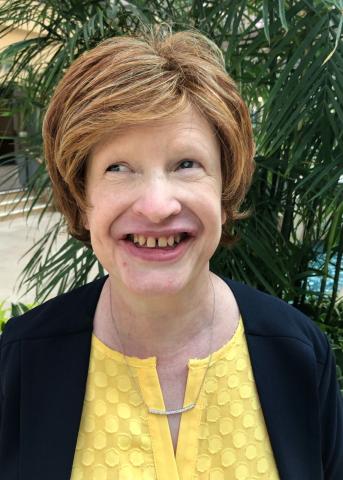
Jennifer Ottowitz, M.S. Ed., CVRT, has been helping adults who are blind or have low vision live more independently and confidently for over 30 years. With a master's degree in special education for the Visually Impaired from Northern Illinois University and a certification in vision rehabilitation therapy, she worked in center-based programs in Illinois and Wisconsin before providing distance education as a Learning Expert with Hadley. She enjoys many areas of vision rehabilitation therapy, including teaching the use of assistive devices to meet daily needs. Jennifer currently works as an Older Blind Specialist with the Older Individuals Who Are Blind Technical Assistance Center, part of the National Research and Training Center on Blindness and Low Vision.
Funding Statement
This project is 100% supported by grant # H177Z250001 from the U. S. Department of Education, Rehabilitation Services Administration (RSA). Funding for FFY 2027 is $599,706. The contents are those of the author(s) and do not necessarily represent the official views of, nor an endorsement by, RSA or the U.S. Government.